A clearer view of your Mac

Lamplight shows you where your storage has gone, explains what’s actually there, and helps you decide what’s worth cleaning up.

0

Storage shouldn’t be this hard to understand.

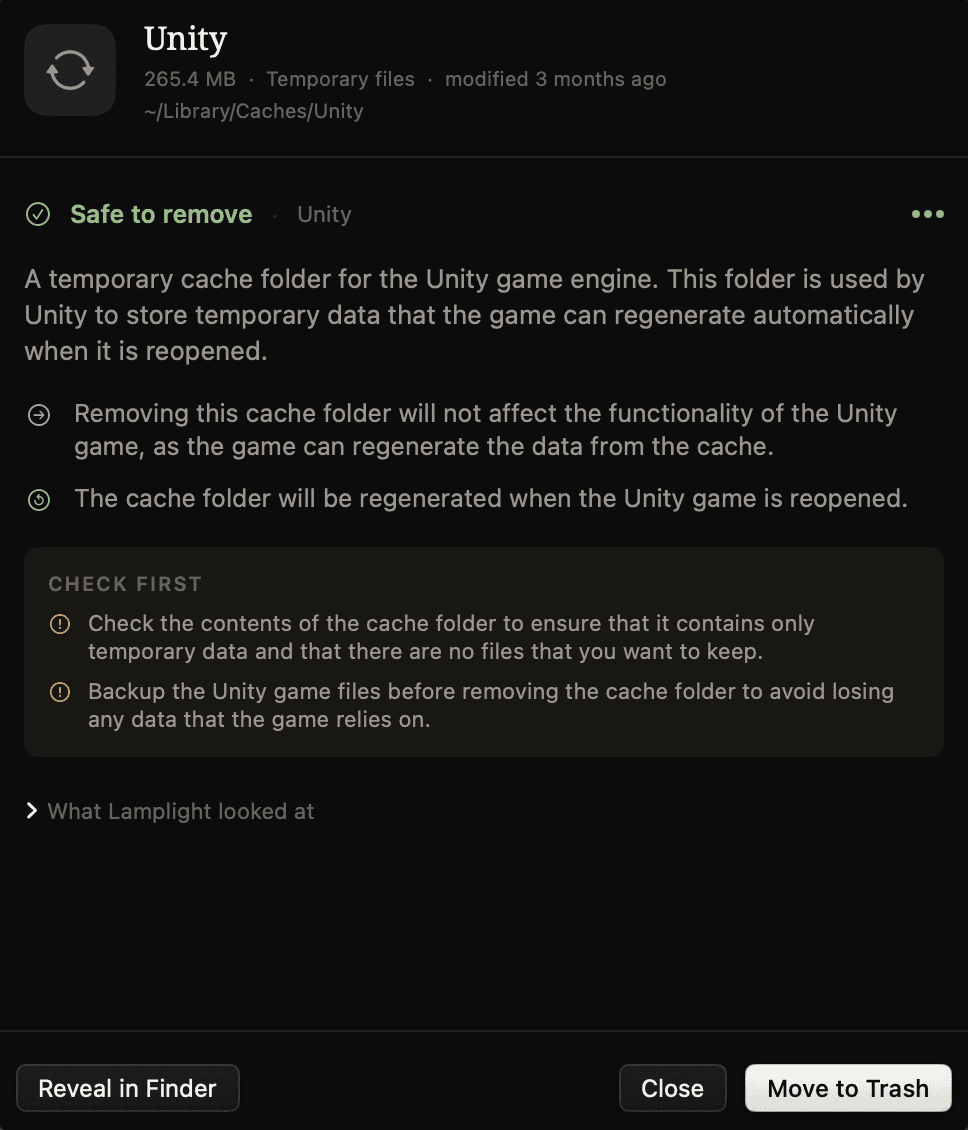
macOS can tell you that “Application Data” is using 70 GB. Lamplight fills in the missing context.

Built with intelligence to transform how you invest, adapt to change, and deliver consistent financial performance.

See your whole storage picture

Understand how your space is split between apps, app data, documents, media, downloads, archives, and more.

Find what’s worth a look
Understand unfamiliar files
Protect what matters
Keep track of what changed
See your whole storage picture

Understand how your space is split between apps, app data, documents, media, downloads, archives, and more.

Find what’s worth a look
Understand unfamiliar files
Protect what matters
Keep track of what changed

A simpler way to take back your storage

Less digging, less guesswork, and more confidence about what stays and what can go.

Understand your Mac's storage

You shouldn’t need to know what a container, cache, support folder, or leftover app file is just to free up space. Lamplight turns the messy parts of macOS storage into something you can actually understand.

Make cleanup decisions with more confidence

Large doesn’t always mean useless, and old doesn’t always mean safe to remove. Lamplight adds context before you act, so you know why something is being suggested instead of relying on guesswork.

Clean up without losing control

Important files stay out of casual cleanup suggestions, every action is tracked, and removed items go to the Trash first. If you change your mind, Lamplight gives you a clear history of what happened and a way back.

A few things you might want to know

Does Lamplight send my files or data to the internet?
Does Lamplight delete files automatically?
Why does Lamplight ask for Full Disk Access?
How is Lamplight different from a normal Mac cleaner?
Is Lamplight a subscription?
Does Lamplight require an internet connection?
Can Lamplight guarantee something is safe to remove?
How does Lamplight handle important personal documents?
Can I undo a cleanup?
What happens if Lamplight doesn’t recognize something?
Does Lamplight work with external drives and individual folders?
Can I try it before paying?

You can download Lamplight and scan your Mac to explore the overall storage picture for free. The full Review experience, detailed recommendations, and cleanup tools are unlocked with the paid version.

Does Lamplight send my files or data to the internet?
Does Lamplight delete files automatically?
Why does Lamplight ask for Full Disk Access?
How is Lamplight different from a normal Mac cleaner?
Is Lamplight a subscription?
Does Lamplight require an internet connection?
Can Lamplight guarantee something is safe to remove?
How does Lamplight handle important personal documents?
Can I undo a cleanup?
What happens if Lamplight doesn’t recognize something?
Does Lamplight work with external drives and individual folders?
Can I try it before paying?

You can download Lamplight and scan your Mac to explore the overall storage picture for free. The full Review experience, detailed recommendations, and cleanup tools are unlocked with the paid version.

Make room without guessing.

See what’s taking up space, understand what it is, and decide what’s worth keeping.

Start building smarter investing workflows with secure infrastructure and financial agents.

Understand your storage. Keep what matters. Make room with confidence.

©2026 Lamplight - All rights reserved.

Understand your storage. Keep what matters. Make room with confidence.

©2026 Lamplight - All rights reserved.

Understand your storage. Keep what matters. Make room with confidence.

©2026 Lamplight - All rights reserved.